
Remote team communication best practices involve establishing clear protocols between synchronous (real-time) and asynchronous (delayed) interactions to prevent burnout and ensure clarity. Effective strategies prioritize psychological safety, clarify tone in text-based channels, and intentionally structure social interactions to replicate organic bonding, ensuring teams remain aligned and connected despite physical distance.
The Psychology of Virtual Connection
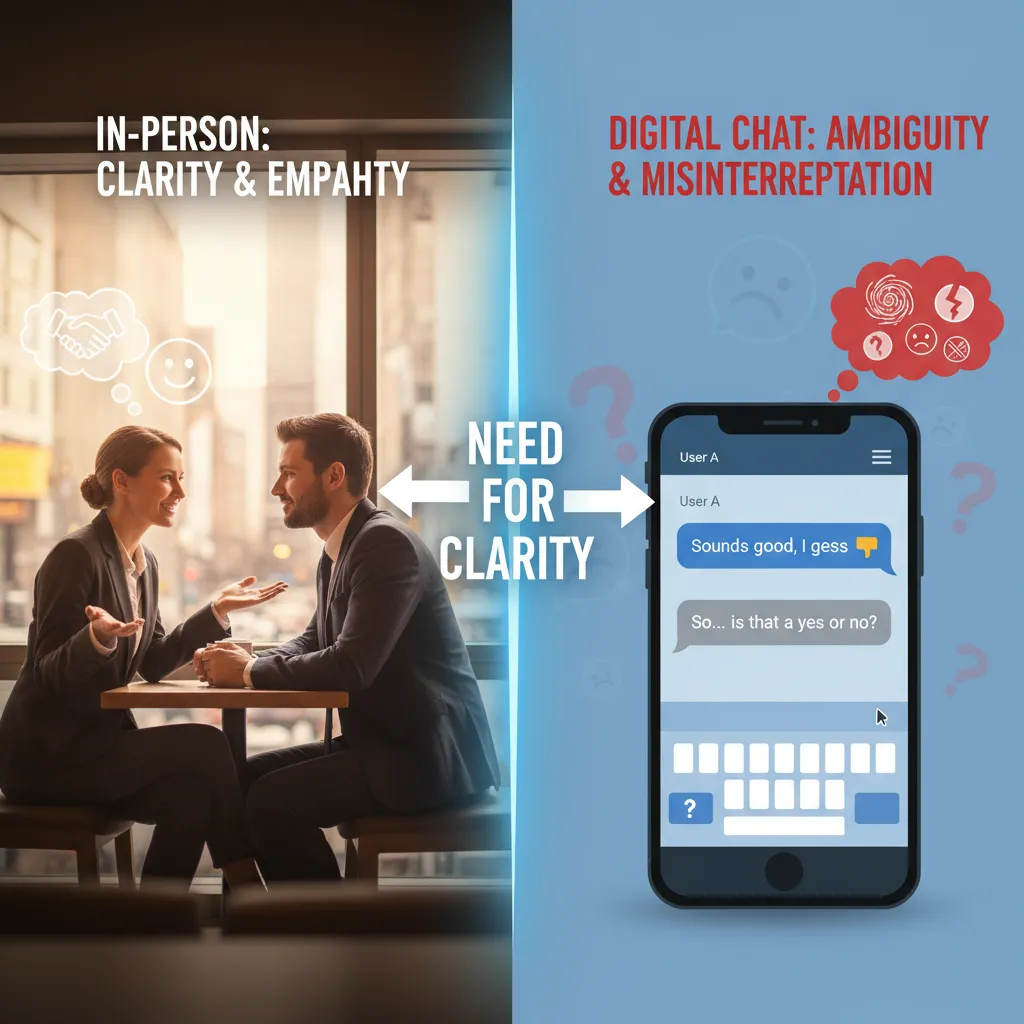
The transition to remote work is not merely a logistical shift; it is a profound psychological adjustment. In a traditional office, humans rely heavily on non-verbal cues—micro-expressions, body posture, and tone of voice—to gauge safety, trust, and intent. In the digital realm, these cues are often stripped away or distorted by latency and low-resolution video, leading to a phenomenon known as the “ambiguity gap.”
When communication lacks clarity, the human brain has a tendency to fill in the blanks with negative assumptions. A short message like “We need to talk” can trigger an anxiety response in a remote employee that wouldn’t exist if the manager had simply walked by their desk with a smile. Therefore, the foundation of remote team communication best practices lies in over-communication and explicit emotional context.
To foster psychological safety, leaders must normalize the challenges of isolation. It is essential to recognize that behind every avatar is a human being navigating the blurred lines between home life and professional obligations. By approaching communication through a lens of empathy and psychology, we can transform digital barriers into bridges for deeper connection.
Mastering Asynchronous vs. Synchronous Workflows
One of the most critical errors remote teams make is attempting to replicate the immediacy of the physical office in a virtual environment. This leads to a culture of “always-on” responsiveness, where employees feel tethered to Slack or Microsoft Teams, resulting in fragmented attention and reduced productivity.
The Power of Asynchronous Communication
Asynchronous communication occurs when there is a time lag between the sender and the recipient. This includes email, project management comments (like Jira or Asana), and recorded video updates. The psychological benefit of async is autonomy. It allows deep work to occur without interruption.
Best practices for async communication include:
- The “No Hello” Rule: Avoid sending a message that just says “Hi” and waiting for a response. State your request, context, and deadline immediately to respect the recipient’s time.
- Contextual Richness: Since you aren’t there to clarify, include screenshots, links, and detailed explanations to prevent back-and-forth ping-pong.
- Deadlines, Not ASAP: “ASAP” breeds anxiety. Specific deadlines (e.g., “by Tuesday at 2 PM EST”) provide structure and safety.
When to Sync Up
Synchronous communication (Zoom, phone calls, instant messaging) should be reserved for specific scenarios where nuance and speed are required. Relying solely on text can lead to conflict spirals where tone is misinterpreted. Use synchronous methods for:
- Complex Problem Solving: Brainstorming requires high-bandwidth interaction.
- Emotional Conversations: Never deliver critical feedback or discuss sensitive personal issues via text.
- Crisis Management: When immediate action is required to fix a live issue.
The Art of Digital Nuance: Clarifying Tone
In the absence of vocal inflection, text-based communication is a minefield of potential misunderstandings. A period at the end of a short sentence can look aggressive to a Gen Z employee, while a lack of punctuation might look unprofessional to a Boomer. Navigating this requires a high degree of emotional intelligence.
Emoji as Emotional Punctuation
In professional psychology, emojis serve as “emotional punctuation.” They replace the smile, the nod, or the furrowed brow. While they should be used judiciously, they are vital tools for softening critical feedback or confirming agreement without sounding curt.
For example, receiving a message that says “Change this” can feel demanding. A message that says “Could we tweak this slightly? 🤔” invites collaboration rather than compliance. It signals that the sender is in a contemplative, not combative, state of mind.
Intentional Explicitness
Assume positive intent, but write to prevent negative interpretation. If you are rushing and send a brief message, preface it. “Heading into a meeting, sending this quickly—please check the report.” This context prevents the receiver from wondering if your brevity implies anger.

Combating Zoom Fatigue and Cognitive Overload
“Zoom fatigue” is not just a buzzword; it is a documented psychological condition. According to research from Stanford University, video conferencing causes cognitive overload due to excessive eye contact, the cognitive load of processing one’s own image (the “mirror effect”), and the restriction of physical mobility.
To mitigate this and maintain a healthy remote culture:
- Hide Self-View: Constantly seeing yourself is unnatural and exhausting. Most platforms allow you to hide your self-view while still broadcasting your video to others.
- Audio-Only Breaks: Normalize “walking meetings” where video is turned off, allowing participants to move around. Physical movement is linked to better cognitive processing and creativity.
- The 50-Minute Hour: Schedule meetings for 25 or 50 minutes rather than 30 or 60. This provides a physiological reset buffer between calls to use the restroom, get water, or simply look away from the screen.
For more on the psychological impacts of video conferencing, you can review the findings on Zoom fatigue and computer-mediated communication.
Building Rapport Without the Water Cooler
Spontaneous social interaction—the “water cooler” effect—is the glue that holds teams together. In a remote setting, spontaneity must be engineered. This sounds paradoxical, but without intentional structure, social bonding rarely happens.
Structured Socializing
Dedicating the first 5 minutes of a meeting to non-work talk is good, but often insufficient. Consider implementing:
- Virtual Coworking Hours: Open a video channel where everyone works silently with microphones off, simulating a library environment. It creates a sense of presence without the pressure to perform.
- “Donut” Calls: Use Slack plugins like Donut that randomly pair team members for a 15-minute coffee chat. This connects people across departments who might otherwise never interact.
- Personal User Manuals: Have every team member write a “User Manual” answering questions like “How I like to receive feedback,” “My peak productivity hours,” and “Signs I am stressed.” This accelerates the getting-to-know-you process.

Drafting Your Team Communication Charter
To solidify these best practices, every remote team should co-create a Communication Charter. This is a living document that outlines the “Rules of Engagement.” Without this, team members are left to guess the norms, leading to friction.
Your charter should answer:
- Response Time Expectations: What is the expected turnaround time for an email vs. a Slack message? (e.g., Email = 24 hours, Slack = 4 hours).
- Channel Utility: Where do we store documents? Where do we chat casually? Where do we post urgent alerts?
- Do Not Disturb Protocols: How do we signal deep work modes? Is it acceptable to snooze notifications after 6 PM?
By explicitly defining these boundaries, you remove the guilt associated with disconnecting and the anxiety associated with waiting for a response. This clarity is the ultimate form of kindness in a remote environment.
For further reading on organizational behavior and communication structures, resources from Harvard Business Review often provide excellent case studies on successful remote transitions.
People Also Ask
What are the 5 C’s of remote communication?
The 5 C’s of remote communication are typically defined as Clear, Concise, Contextual, Consistent, and Compassionate. Ensuring your messages meet these criteria helps reduce ambiguity and builds trust in a virtual environment where non-verbal cues are missing.
How do you improve communication with a remote team?
To improve communication, establish a clear team charter that defines which tools to use for what purpose (e.g., Slack for quick chats, Email for formal requests). Additionally, prioritize asynchronous updates to reduce meeting fatigue and schedule regular non-work social time to build rapport.
What is the golden rule of remote work communication?
The golden rule is “Assume Positive Intent.” Because text lacks tone, it is easy to misinterpret brevity as rudeness. Always assume your colleague is helpful and professional unless proven otherwise, and ask for clarification before reacting emotionally.
How often should a remote team meet?
Frequency depends on the team’s function, but a general best practice is a daily 15-minute “stand-up” for agile teams, and a weekly 45-60 minute “all-hands” or team sync for broader updates. One-on-ones between managers and direct reports should happen weekly or bi-weekly.
What are the barriers to effective remote communication?
Common barriers include technical issues (poor internet/audio), time zone differences, cultural and language barriers, lack of visual cues, and “siloing” where information isn’t shared across different departments.
How do you handle conflict in a remote team?
Handle conflict by moving the conversation from text to video or phone immediately. Text-based arguments escalate quickly due to lack of tone. A synchronous conversation allows for empathy, active listening, and faster resolution of misunderstandings.